AES-256-GCM
Authenticated encryption for your TOTP vault. Secrets stay confidential and tamper-evident — the same standard trusted by enterprise security teams.
App Purpose: OTPSync is a secure 2FA authenticator extension designed to generate secure one-time verification codes (TOTP/HOTP) for logging into your accounts. To prevent accidental lockouts, OTPSync requests Google account access strictly to sync and back up your client-side encrypted 2FA vault directly to your personal Google Drive.
Your master passcode never leaves the browser. OTPSync derives keys locally with PBKDF2 (600,000 iterations), encrypts your TOTP vault with AES-256-GCM, and uploads only ciphertext — true zero-knowledge authenticator architecture.
Never lose access to your OTP codes. Back up your encrypted vault to OTPSync Cloud, your personal Google Drive, or both — redundant 2FA backup with zero vendor lock-in.
Run OTPSync on every browser and machine you trust. Premium delivers unlimited device slots, real-time encrypted vault sync, and a dashboard to monitor or revoke any installation remotely.
Unlimited device slots
Free plan allows 1 device. Premium removes the limit — laptop, desktop, work PC, all connected.
Real-time vault sync
Add an account on one device and it propagates to every other installation through encrypted cloud backup.
Full dashboard control
See every registered device, online/offline status, last active time — and revoke access instantly.
Logout or remote wipe
Revoke with Logout Only or Logout & Wipe Data — same options as your Devices dashboard.
Manage extension installations
a3f8…9c2d
Last active: 2m ago
b7e1…4f8a
Last active: 5m ago
c9d2…1a7b
Last active: 2 days ago
Migrate from Google Authenticator, scan QR codes, paste setup URIs, or enter secrets manually. OTPSync is a flexible OTP manager built for real onboarding workflows.
Scan current tab
Find and import QR codes displayed on the page you're viewing — no screenshot needed.
Upload QR image
Multi-accountDrop a screenshot or exported QR image. One file can contain multiple accounts — perfect for merging your Google Authenticator export into OTPSync.
Add via URI
Paste an otpauth:// setup link when a site
gives you a text key instead of a QR code.
Manual entry
Type issuer, account name, and Base32 secret directly — full control when nothing else fits.
Tap + to add your first account
otpauth://totp/GitHub:user?secret=JBSW…
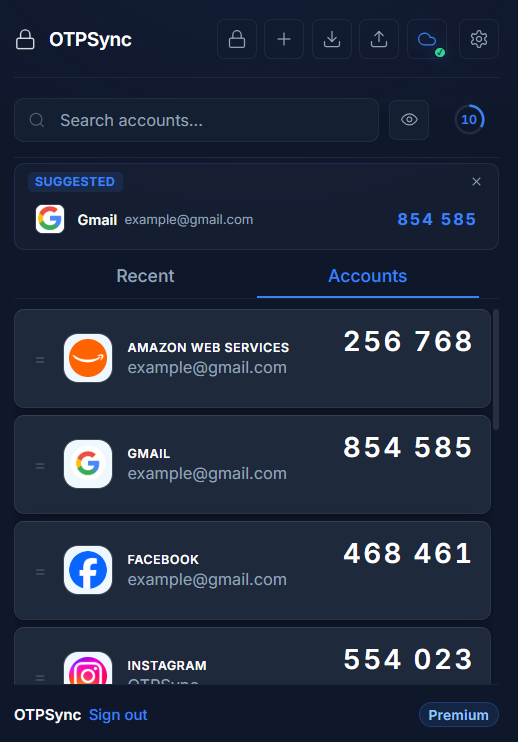
OTPSync reads the active tab and surfaces matching TOTP accounts at the top of the extension — the right browser-based OTP is always one click away.
Domain & brand matching
Matches accounts by stored domain, issuer name, or core keywords extracted from the active tab hostname.
Instant copy from the banner
Tap any suggested card to copy the live OTP — the right code is always one click away.
Premium feature
Enable Smart Suggestions in Settings. Dismiss for the session anytime with one tap.
Enter the 6-digit code from your authenticator app.
Enable Fill With OTPSync in the context menu. Right-click any OTP field on any website and inject the matching code — secure two-factor authentication without clipboard juggling or tab switching.
Native browser context menu
A dedicated "Fill With OTPSync" entry appears when you right-click inside any OTP field.
Smart account resolution
OTPSync picks the best matching account for the current page before filling the field automatically.
Toggle on in Settings
Enable or disable the context menu entry anytime from the extension settings panel.
Watch → Scroll to see the autofill demo play automatically.
Working in a shared space or presenting on screen? Mask every TOTP code instantly with the built-in visibility toggle — shoulder-surfing protection without leaving your browser workflow.
Shoulder-surfing protection
Mask every OTP with asterisks so nobody glancing at your screen can read your codes.
Safe screen sharing
Present or stream without exposing live 2FA tokens — reveal them only when you need to copy.
Persists across sessions
Your preference is saved locally — codes stay hidden every time you open the extension until you toggle them back.
Try it → Click the eye button in the demo panel.
Protect your encrypted vault with a 6-digit master passcode. Configure auto-lock timers and OTPSync wipes encryption keys from memory after inactivity — local encryption that stays local.
Master Passcode
Require a 6-digit passcode to open the vault. Change it anytime from Settings → Passcode Lock.
Configurable Auto-Lock
Choose 1 min, 5 min, 15 min (default), 30 min, 1 hour, or Never. The vault locks automatically after the selected idle period.
Keys wiped from memory
On lock, the derived encryption key is cleared from session storage. Your ciphertext stays encrypted until you re-enter the passcode.
Premium → Auto-Lock timers are available on the Premium plan.
Authentication
Master Passcode
Require a 6-digit passcode to open the vault.
Change Passcode
Security
Auto-Lock
The vault will automatically lock after this period of inactivity.
Enter your passcode to unlock the vault
Left a browser session open at the office? Remotely revoke access or wipe the encrypted vault from any registered device — full control over your authenticator sync footprint.
Real primitives behind OTPSync — AES-256-GCM, PBKDF2 with 600,000 iterations, SHA-256 integrity checks, and browser-native encryption with no plaintext storage.
Authenticated encryption for your TOTP vault. Secrets stay confidential and tamper-evident — the same standard trusted by enterprise security teams.
Your master passcode is stretched with 600,000 SHA-256 iterations before key derivation — raising the cost of brute-force attacks dramatically.
Cryptographic integrity verification ensures encrypted payloads cannot be silently modified in transit or at rest.
Encryption keys live in session memory and are wiped on lock. No server access to secrets. No keys written to disk. No plaintext OTP storage — ever.
Google Authenticator is mobile-only and Authy discontinued its desktop app. OTPSync is the Google Authenticator alternative for desktop — a Chrome 2FA extension with encrypted sync, one-click import, and right-click autofill.
 OTPSync
Own your OTP manager forever — start free, upgrade once for unlimited authenticator sync.
Perfect for a single primary desktop environment.
Unlimited devices and secrets forever. No recurring billing.
Everything you need to know about browser-based 2FA, encrypted backup, and migrating to OTPSync.
A browser authenticator is a TOTP extension that generates time-based one-time passwords directly inside your web browser. OTPSync keeps codes in your desktop workflow with encrypted sync, autofill, and backup — without relying on a separate mobile app.
Yes. OTPSync works alongside Google Authenticator as a desktop companion. Keep your phone app if you prefer, then import exported QR images into OTPSync to access the same accounts in your browser with encrypted backup and autofill.
Google does not offer an official Google Authenticator app for Windows or Mac. The practical way to get your codes on a computer is a Chrome authenticator extension: export your accounts from the Google Authenticator app as QR codes and import them into OTPSync to generate the same 2FA codes in your browser.
Open Google Authenticator, tap Transfer accounts → Export accounts, and save the QR codes it shows. In OTPSync, choose Upload QR image and select those screenshots — every account in the export is imported into your encrypted vault in one step. See the full step-by-step transfer guide.
Yes. OTPSync generates TOTP codes entirely in Chrome, so you can use two-factor authentication without a phone. Add accounts by scanning the QR code on screen, pasting the setup key, or importing an existing export — your codes then live in your browser with encrypted backup.
Yes. Once your vault is unlocked, OTPSync generates TOTP codes locally in the browser without an internet connection. Cloud sync requires connectivity, but day-to-day authentication works offline.
Yes. OTPSync uses true zero-knowledge architecture. Your master passcode never leaves the browser, secrets are encrypted with AES-256-GCM before upload, and our servers only store ciphertext — never plaintext OTP secrets.
Yes. OTPSync supports encrypted cloud backup to OTPSync Cloud, your personal Google Drive appDataFolder, or both simultaneously for redundant 2FA backup without vendor lock-in.
Yes. Premium unlocks unlimited devices so you can sync Chrome, Edge, Firefox, and multiple machines through the same encrypted vault with real-time cross-browser synchronization.
Yes. Export your accounts from Google Authenticator as QR images and upload them to OTPSync. A single image can contain multiple accounts, making desktop migration fast and straightforward.
Browser-based 2FA is secure when implemented correctly. OTPSync encrypts secrets locally with AES-256-GCM, derives keys via PBKDF2 with 600,000 iterations, verifies integrity with SHA-256, wipes keys from memory on lock, and never stores plaintext on servers.
Because OTPSync is zero-knowledge, we cannot reset your passcode. If you forget it, encrypted vault access is permanently lost. Save your backup recovery phrase during setup.
Yes. Enable both backup destinations at once. Your encrypted vault syncs to OTPSync Cloud and your Google Drive in real time for maximum redundancy.
Install OTPSync — the encrypted authenticator extension trusted for cross-browser sync, cloud backup, and zero-knowledge security.
Add OTPSync to ChromeWe use cookies to measure how visitors find OTPSync and to improve our ads. You can decline — the site works exactly the same either way. Privacy Policy